📅 Weekly Schedule
Configure which days and hours the bot can automatically book rides.
Overview
The Weekly Schedule controls when rides can be auto-scheduled. The bot monitors rides 24/7 but only auto-books rides that start during your enabled time slots.
Key features:
- Day divided into intervals (default: 2-hour blocks from 00:00-23:59)
- Each interval can be enabled ✅ or disabled ❌ independently per weekday
- Configurable interval sizes: 30 min, 1 hour, 2 hours, 4 hours
- Does not affect ride notifications (they work 24/7)
How to Configure
-
Type
/configin the bot -
Select 📅 Weekly Schedule
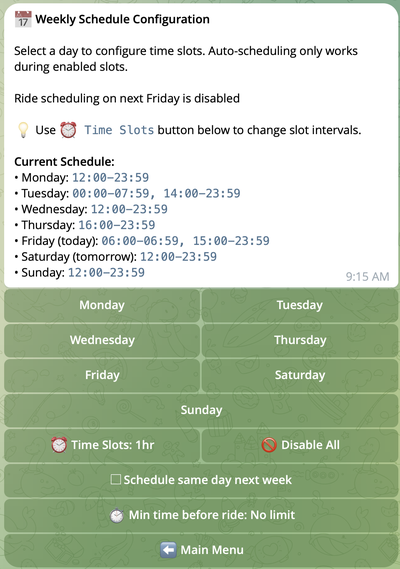
Step 1: Choose Interval Size (Optional)
Click ⏰ Time Slots: [interval] to change block size.
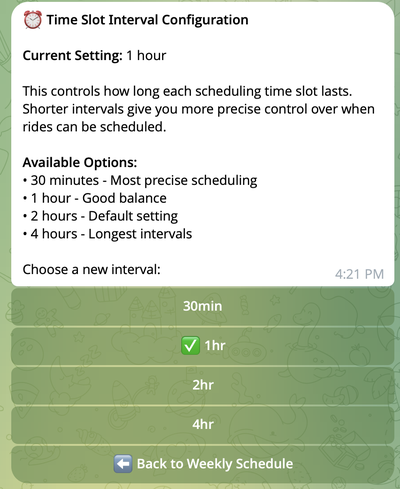
Step 2: Select a Day
Click any weekday button (Monday, Tuesday, etc.)
Step 3: Enable Time Slots
Toggle intervals on/off for that day:
- ✅ = Auto-scheduling enabled
- ❌ = Auto-scheduling disabled
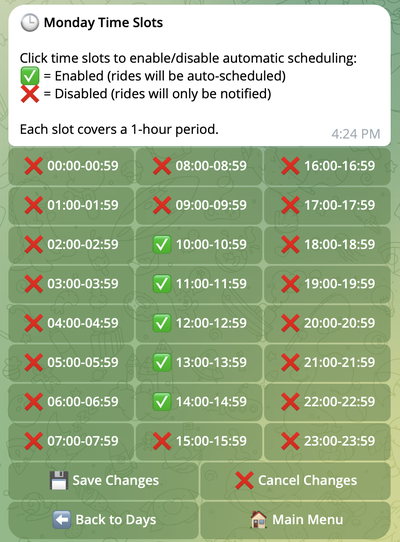
Step 4: Save Changes
Click 💾 Save Changes after configuring each day.
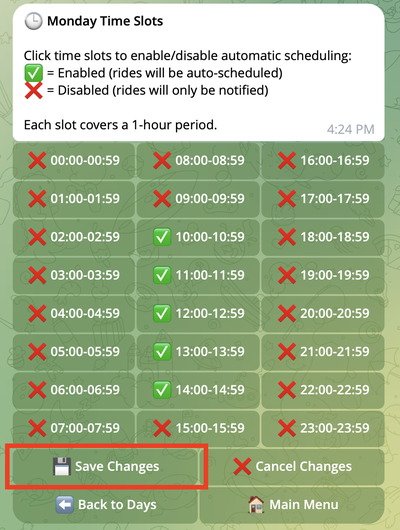
Changes won't take effect unless you click 💾 Save Changes.
Step 5: Repeat
Configure remaining weekdays as needed.
7-Day Scheduling Limit
The ✅ Schedule same day next week checkbox controls whether rides can be scheduled exactly 7 days ahead (same weekday next week).
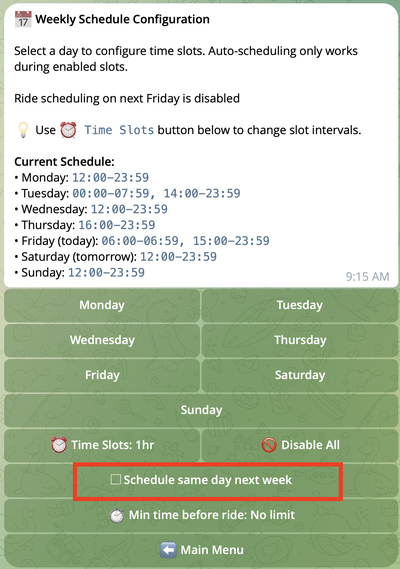
Why it matters: Gig platforms show rides up to 7 days in advance. If today is Friday and you enable Friday slots, the bot sees rides for THIS Friday and NEXT Friday (7 days from now).
| Setting | What Gets Scheduled |
|---|---|
| ✅ Enabled | Days 0-7 (including same day next week) |
| ☐ Disabled | Days 0-6 only (blocks same day next week) |
Use Case
You don't normally work Fridays, but want to work this Friday only.
Problem: After enabling Friday slots, bot schedules rides for both THIS Friday and NEXT Friday.
Solution: Disable the checkbox → bot ignores next Friday's rides.
Example:
Today: Friday, Nov 21
Enabled: Friday 10:00-18:00
Checkbox DISABLED → Bot schedules Nov 21-27, skips Nov 28
Disable this when working a day you normally don't work, to prevent unwanted scheduling for that same day next week.
⏱️ Minimum Time Before Ride
Control how far in advance rides must start to be auto-scheduled.
Overview
This setting prevents the bot from auto-scheduling rides that start too soon. For example, if you set this to 60 minutes, rides starting in less than 60 minutes won't be auto-booked — you'll receive a notification instead, allowing you to decide manually.
How to Configure
- Type
/configin the bot - Select 📅 Weekly Schedule
- Click ⏱️ Min time before ride: [current value]
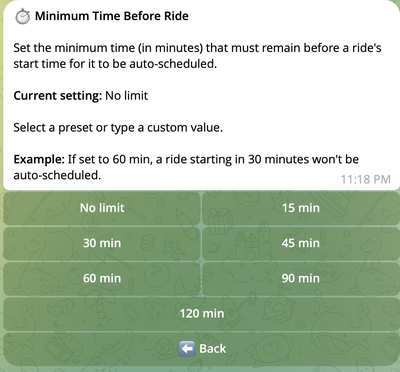
Available Options
| Value | Effect |
|---|---|
| No limit | Auto-schedule rides regardless of start time (default) |
| 30 min | Skip rides starting in less than 30 minutes |
| 60 min | Skip rides starting in less than 1 hour |
| 90 min | Skip rides starting in less than 1.5 hours |
| 120 min | Skip rides starting in less than 2 hours |
| Custom | Type any value (e.g., 45 for 45 minutes) |
When to Use
| Scenario | Recommended Value |
|---|---|
| Want maximum ride opportunities | No limit |
| Need prep time before leaving | 30-60 min |
| Working from home, need travel time to pickup | 60-90 min |
| Want buffer for unexpected delays | 90-120 min |
Example
Setting: 60 minutes
| Ride Starts In | Result |
|---|---|
| 30 minutes | ❌ Not auto-scheduled (notification sent) |
| 45 minutes | ❌ Not auto-scheduled (notification sent) |
| 75 minutes | ✅ Can be auto-scheduled |
| 2 hours | ✅ Can be auto-scheduled |
Even when a ride is skipped by this setting, you'll receive a notification and can still book it manually using the Reserve button.
Auto-Scheduling Logic
| Condition | Result |
|---|---|
| Ride starts during active pause period | 📱 Notification only (manual booking available) |
| Ride starts sooner than Min time before ride setting | 📱 Notification only (manual booking available) |
| Ride pickup is outside Schedule Area | 📱 Notification only (manual booking available) |
| Ride conflicts with existing reserved rides | 📱 Notification only (manual booking available) |
| Insufficient balance | 📱 Notification only (Reserve button disabled) |
| Ride starts during enabled slot (0-6 days ahead) | ✅ Can be auto-scheduled |
| Ride starts during enabled slot (exactly 7 days ahead), Schedule same day next week is enabled | ✅ Can be auto-scheduled |
| Ride starts during enabled slot (exactly 7 days ahead), Schedule same day next week is disabled | 📱 Notification only (manual booking available) |
| Ride starts during disabled slot | 📱 Notification only (manual booking available) |
| Exception: Auto-Schedule Rule is enforced | ✅ Can be auto-scheduled regardless of time slots |
Auto-scheduling check order:
- Pause Periods – If ride starts during an active pause → skip
- Min Time Before Ride – If ride starts too soon → skip
- Schedule Area – If ride pickup is outside area → skip
- Auto-Schedule Rules – If no rules match → skip (if rule is enforced, step 5 is skipped)
- Weekly Schedule – If ride starts outside enabled time slots → skip
- Balance – If insufficient balance → skip (notification sent without Reserve button)
- Ride Conflicts – If conflicts with existing reserved rides → skip
Important notes:
- Time slots only affect auto-scheduling, not notifications
- Manual booking via Reserve button works regardless of schedule
- Bot checks ride start time, not when ride becomes available
Best Practices
✅ Do:
- Configure interval size before enabling slots
- Save changes after configuring each day
- Start with your core working hours, expand as needed